Best Bank Statement Import
Software for Tally
Import any bank PDF into Tally — Nationalised, Private, or Co-operative banks with complex formats. Smart party ledger detection, auto voucher types, and bill reference matching before posting.
100% automation from PDF to Tally. The only tool that matches outstanding invoices before creating vouchers.
What Makes TallyConnects Different
Three unique features that make bank statement import 100% automated — no other tool offers all three.
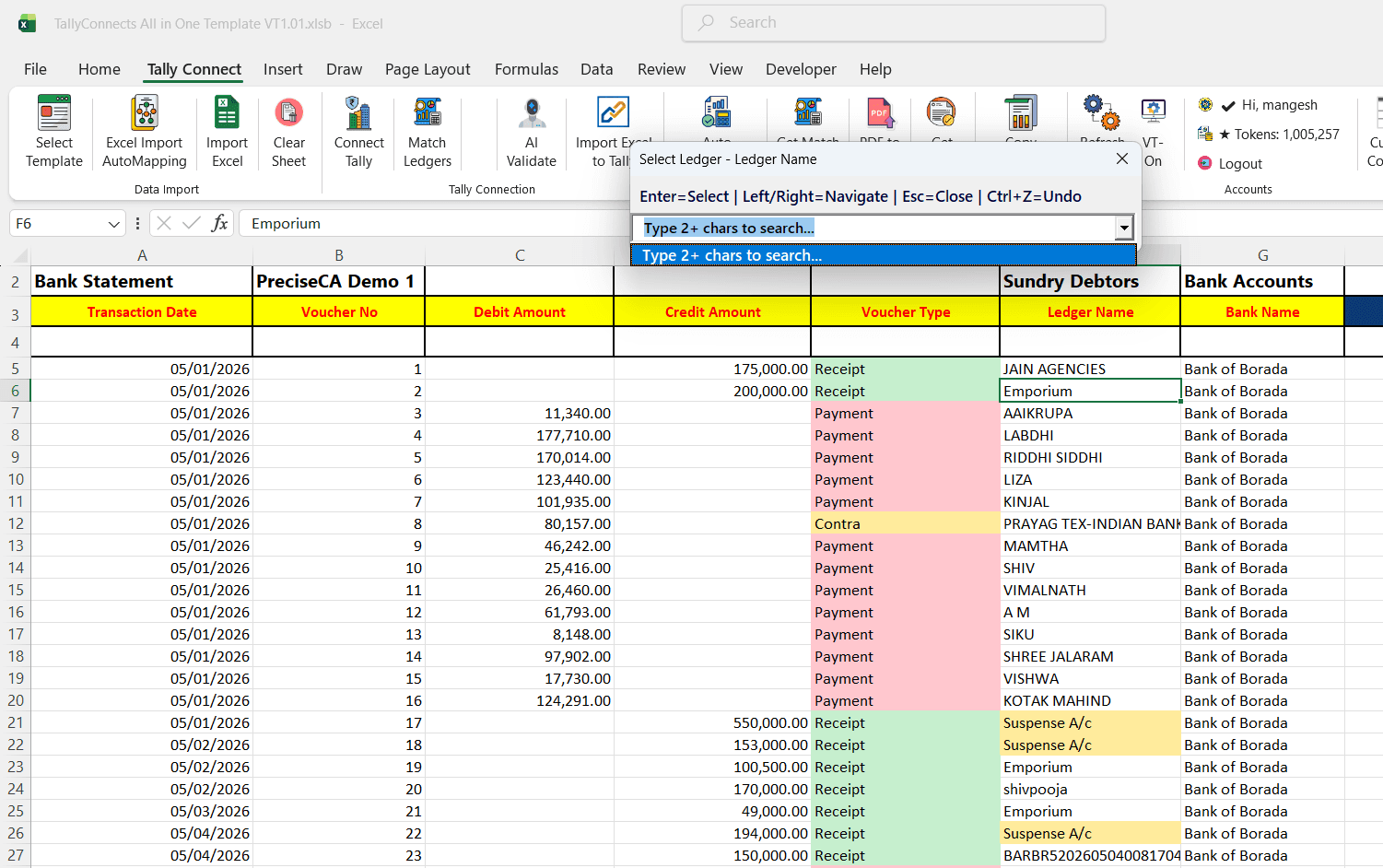
Smart Party Ledger Detection
AI reads bank narrations (NEFT, RTGS, UPI, Cheque) and fuzzy-matches them to your existing Tally ledgers. No manual mapping — the system detects the exact party ledger from the narration text automatically.
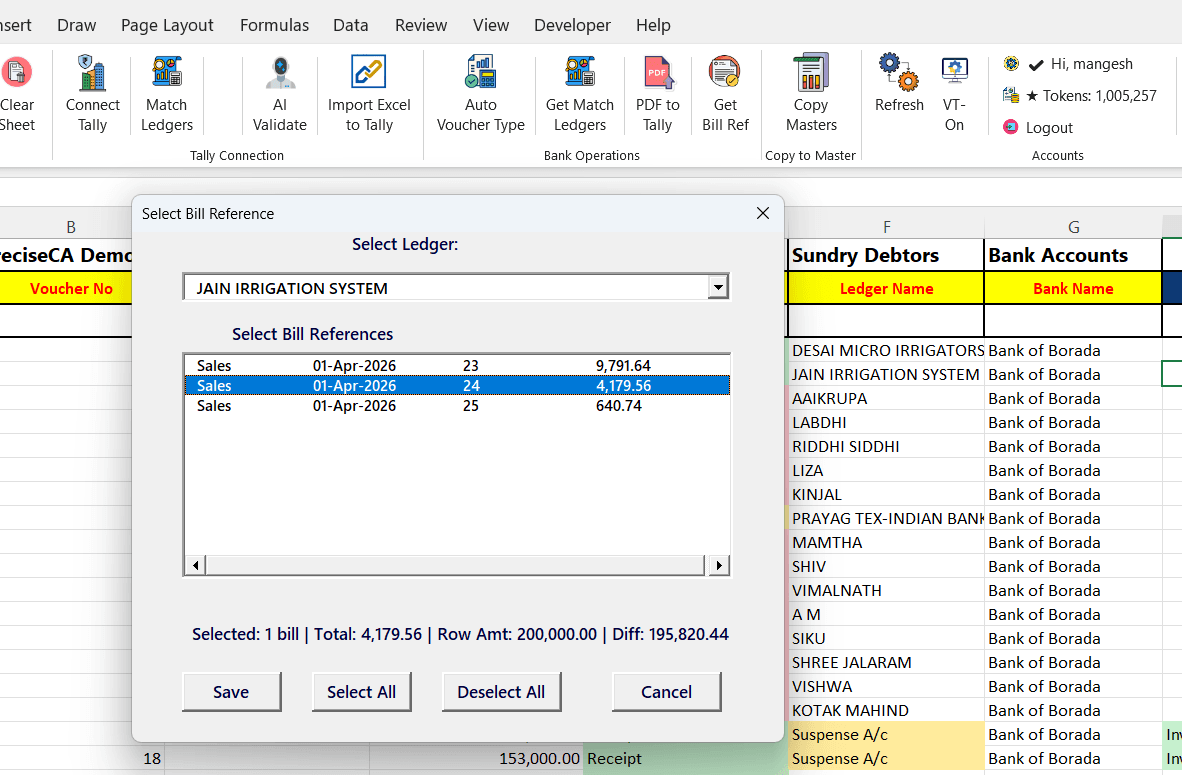
Bill Reference Matching Before Posting
Before creating each voucher, TallyConnects fetches the list of outstanding invoices for that party from Tally. You can select which bill reference to adjust — ensuring 100% accurate bill-by-bill reconciliation with zero manual lookup.
Auto Voucher Type Detection
Credit entries become Receipt, debit entries become Payment, and bank-to-bank transfers are auto-detected as Contra. No need to manually classify hundreds of transactions — TallyConnects handles it all.
How It Works
From PDF upload to Tally posting — 3 simple steps, fully automated.
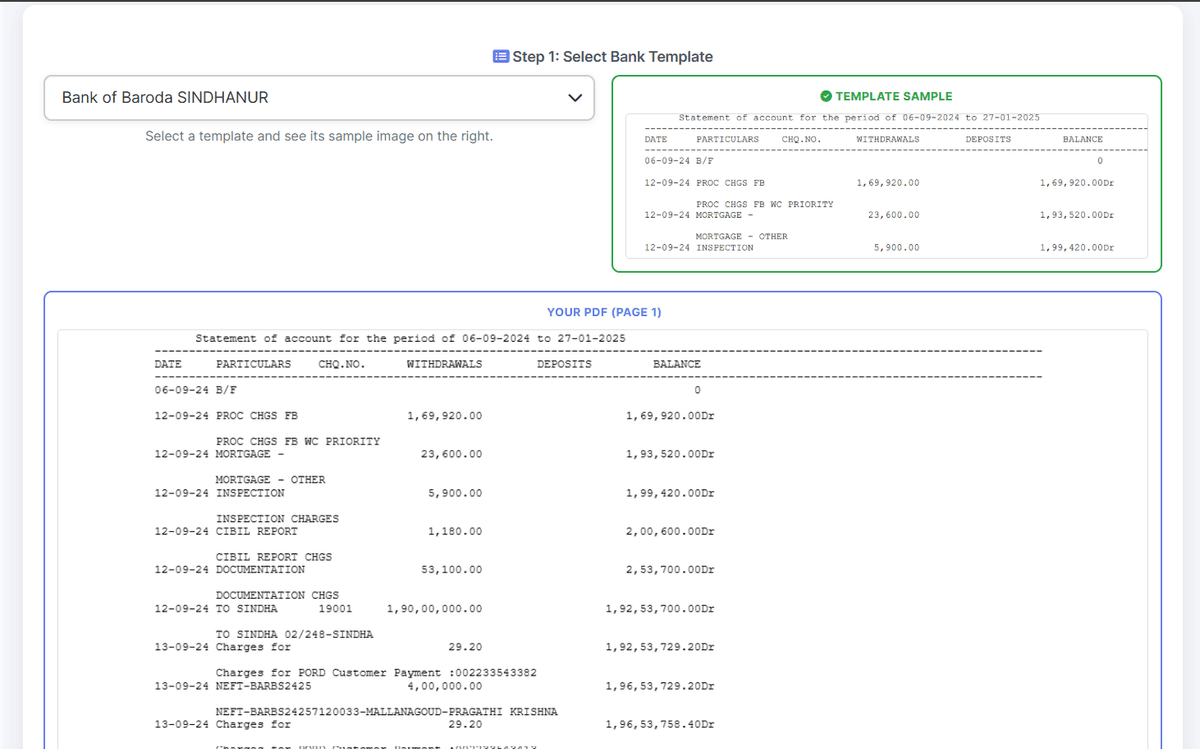
Upload PDF & Select Bank
Upload your bank statement PDF. TallyConnects auto-detects the bank format or you can select from 100+ built-in templates. The tool reads and displays the PDF pages with table detection.
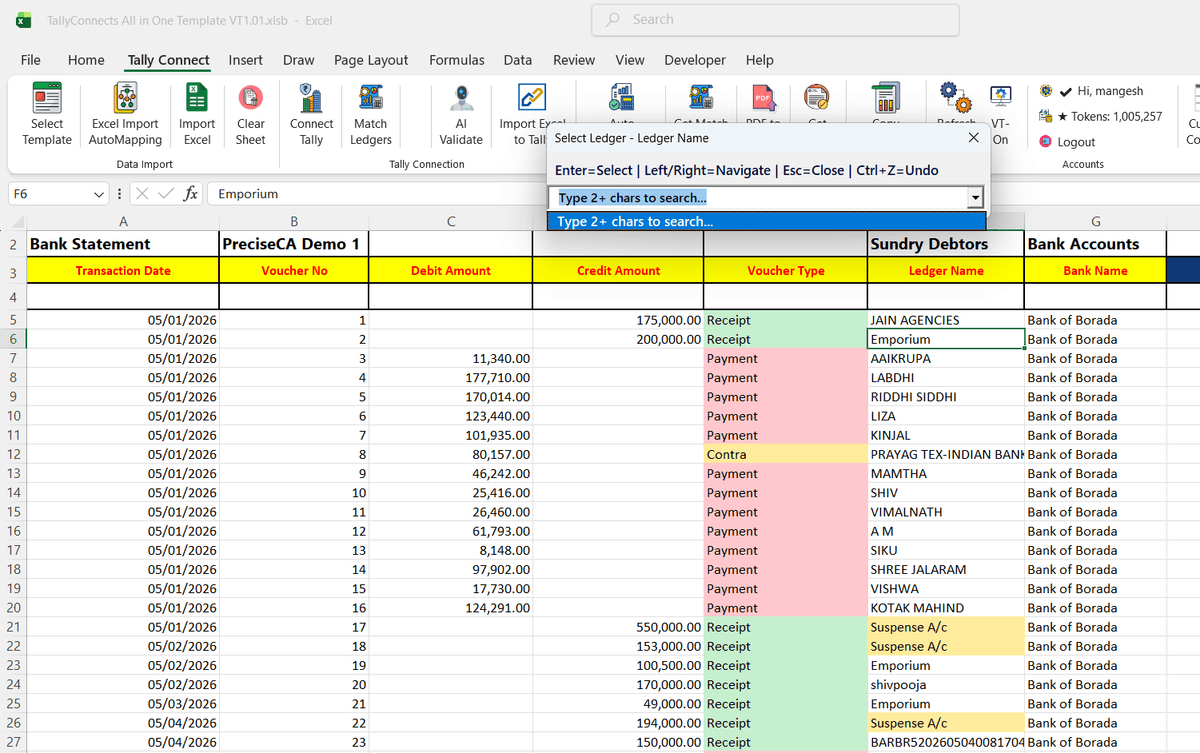
Smart Matching & Review
Extracted data loads into Excel with auto-detected voucher types (Receipt/Payment/Contra), AI-matched party ledgers from narrations, and bill reference suggestions. Review and adjust in Excel before posting.
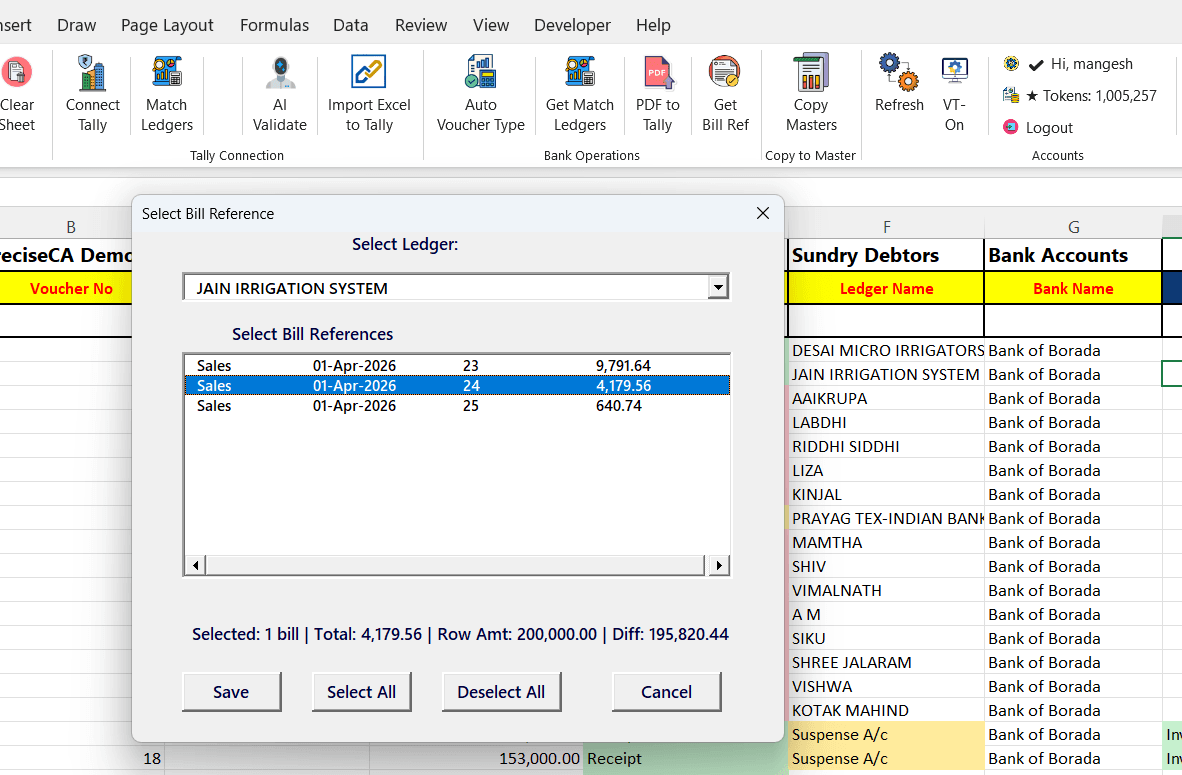
Match Bills & Post to Tally
Select bill references for each voucher from outstanding invoices fetched directly from Tally. Click Import to post all vouchers to Tally in one click with 100% accuracy.
Built for Every Bank Format
Complex PDF Handling
Multi-line narrations, merged cells, non-standard date formats, and unusual table structures — TallyConnects handles them all.
Co-operative Banks
Specially built templates for co-operative and regional banks that use non-standard PDF formats. No more manual data entry for complex statements.
Narration Fuzzy Match
Matches NEFT/RTGS/UPI narrations to your Tally ledgers using intelligent fuzzy matching. Handles abbreviations, partial names, and reference codes.
Receipt / Payment / Contra
Auto-classifies each transaction as Receipt (credit), Payment (debit), or Contra (bank-to-bank/cash transfer) based on amount and matched ledger group.
Bill-by-Bill Adjustment
Fetches outstanding invoices from Tally before posting. Select which bills to adjust against each receipt/payment for accurate reconciliation.
Batch Processing
Import hundreds of bank transactions in one click. Review everything in Excel before posting to Tally — full control with zero risk.
100+ Supported Banks
Nationalised, Private, Co-operative, and Foreign banks — all supported.
 HDFC
HDFC SBI
SBI ICICI
ICICI Axis Bank
 Kotak
Kotak PNB
PNB Bank of Baroda
 Union Bank
 IndusInd
 Yes Bank
 IDBI
IDBI Federal Bank
 Canara Bank
 Bank of India
 Indian Bank
 IOB
IOB Bandhan Bank
 AU Bank
 IDFC First
 UCO Bank
 Central Bank
 Bank of Maharashtra
 RBL Bank
 Saraswat Bank
 DBS
DBS HSBC
HSBC Karnataka Bank
 KVB
KVB TMB
TMB TJSB Bank
And many more — TallyConnects auto-detects any bank format.
Frequently Asked Questions
How to import bank statement excel to tally prime?
With TallyConnects, upload your bank statement PDF or paste bank data into Excel. The software auto-detects the bank format, extracts all transactions, matches party ledgers from narrations, assigns voucher types (Receipt/Payment/Contra), and posts everything to Tally Prime in one click. No manual typing needed.
How to convert bank statement into Tally?
TallyConnects converts any bank statement (PDF or Excel) into Tally vouchers automatically. Upload the statement, the tool reads all transactions, matches each narration to your existing Tally ledgers, and creates Receipt, Payment, or Contra vouchers. It even fetches outstanding invoices for bill-by-bill adjustment before posting.
How to import bank statements in Excel?
TallyConnects reads bank statement PDFs and extracts all transactions into a structured Excel format. It handles complex PDF formats from all Indian banks — nationalised, private, and co-operative. The extracted data shows date, narration, debit/credit amounts, and auto-matched Tally ledgers ready for import.
How to do bank statement entries in tally prime?
Instead of manually typing each bank transaction, use TallyConnects to automate bank statement entries. Upload your bank PDF, review the auto-extracted and matched data in Excel, select bill references for each voucher, and import all entries to Tally Prime in one click. Supports Receipt, Payment, and Contra voucher types.
How do I upload my bank statement?
In TallyConnects, click 'Bank Statement' mode, then upload your bank statement PDF. The software auto-detects your bank from 100+ built-in templates. If your bank isn't detected, you can select the template manually. The PDF is parsed and all transactions appear in Excel for review before importing to Tally.
Which bank formats are supported?
TallyConnects supports all nationalised banks (SBI, PNB, BOB, Canara, etc.), private banks (HDFC, ICICI, Axis, Kotak, etc.), and co-operative banks with complex multi-line PDF formats. Over 100+ bank templates are built-in with auto-detection.
Can it handle complex co-operative bank PDFs?
Yes. TallyConnects handles multi-line narrations, merged cells, non-standard date formats, and complex table structures found in co-operative and regional bank statements.
How does narration-based ledger matching work?
TallyConnects reads the narration/description of each bank transaction and uses fuzzy matching to find the closest matching ledger in your Tally company. It matches NEFT/RTGS references, UPI IDs, cheque details, and party names automatically.
What is Bill Reference Matching?
Before posting each receipt or payment voucher, TallyConnects fetches all outstanding invoices for that party from Tally. You can select which invoice to adjust against, ensuring bill-by-bill reconciliation is accurate.
How much does bank statement import cost?
Bank statement import uses 0.25 tokens per record. With 2,000 tokens (Lite Plan at Rs 2,000), you can import approximately 8,000 bank transactions.
Import Your Bank Statement Now
Stop typing bank transactions manually. Download TallyConnects and import any bank PDF to Tally in minutes.