TallyConnects vs Suvit
Both automate Tally imports — but TallyConnects gives you AI auto-mapping, real-time Tally validation, bill reference matching, and pay-per-use pricing that Suvit does not offer.
6 Features Suvit Cannot Match
These are the features that make TallyConnects the clear choice for serious accountants and CA firms.
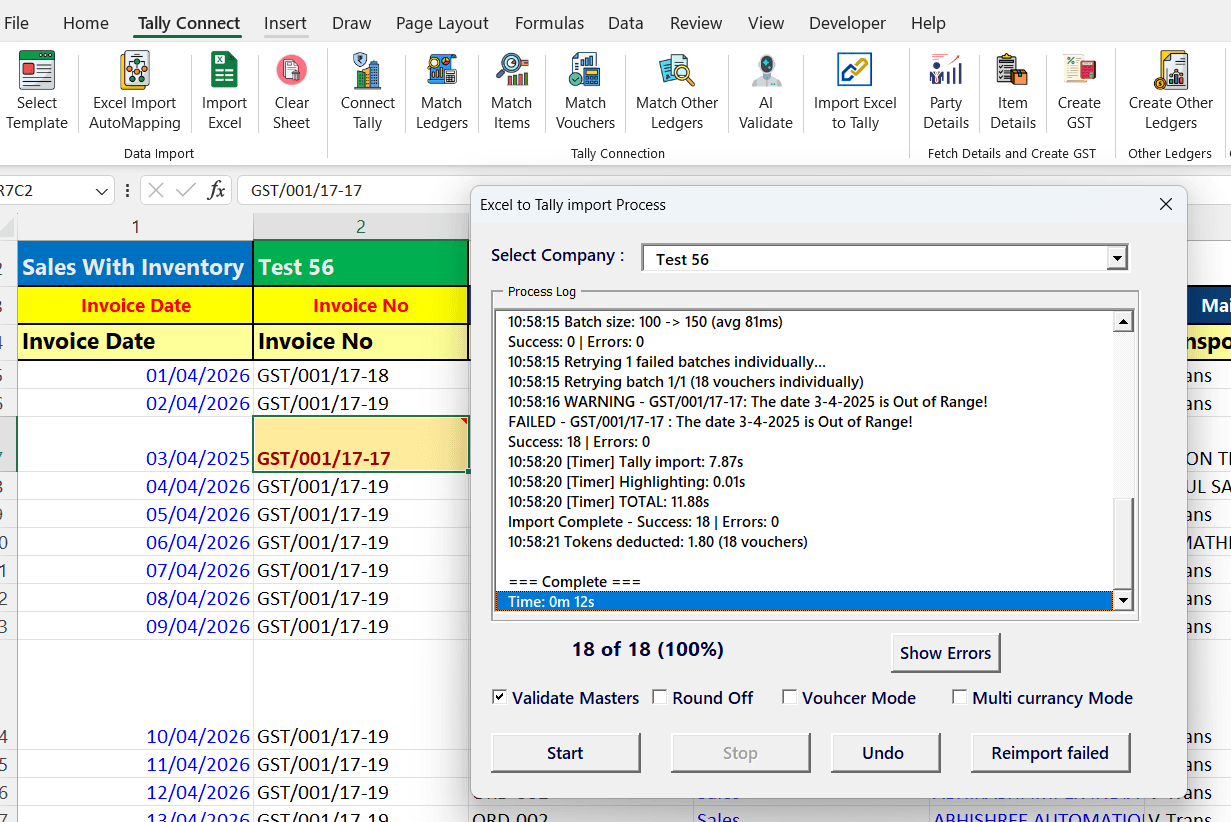
100% Local & Secure — Your Data Never Leaves Your Computer
TallyConnects is a simple, easy-to-use Excel Add-in that runs entirely on your local computer. Your financial data stays on your machine — it is never uploaded to any website or cloud server. Everything works offline between Excel and Tally, giving you complete data privacy and security.
- Works inside Microsoft Excel — no new software to learn
- Data stays 100% on your computer — zero cloud upload
- Direct local connection to Tally — no internet required for import
- No risk of sensitive financial data being exposed online
Suvit: Web-based platform — requires uploading all your financial data to their cloud servers. Your invoices, bank statements, and party details are stored on third-party servers.
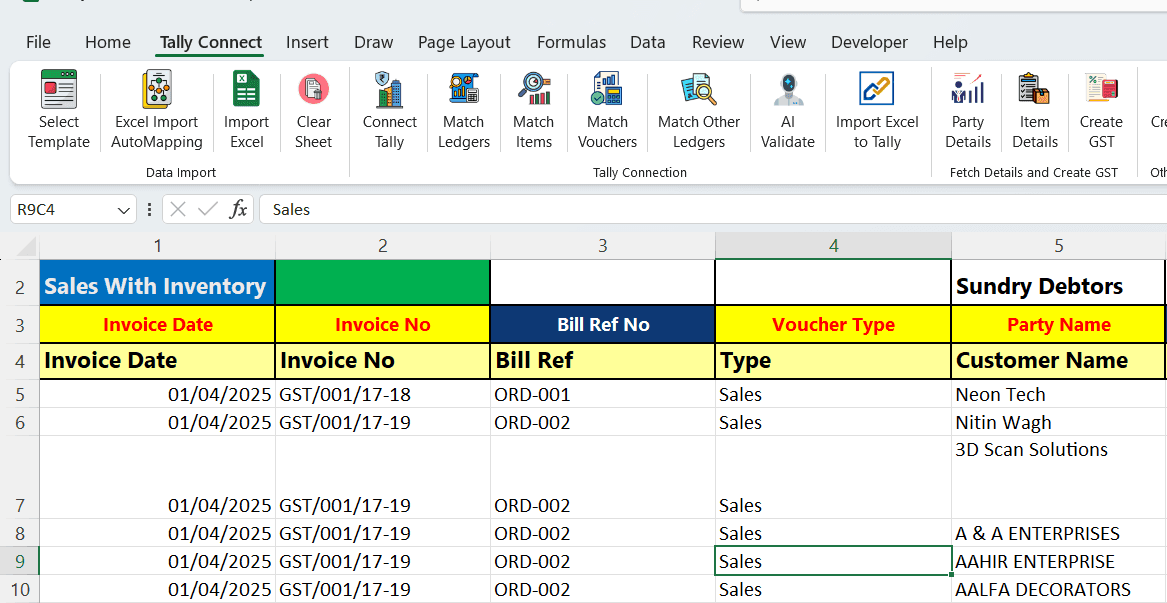
Smart AI Auto-Mapping
Upload any Excel file and TallyConnects AI automatically matches your column headings to Tally fields. No manual mapping needed — it understands abbreviations, alternate names, and custom headers.
Suvit: Requires manual column mapping for each file format. No intelligent auto-detection.
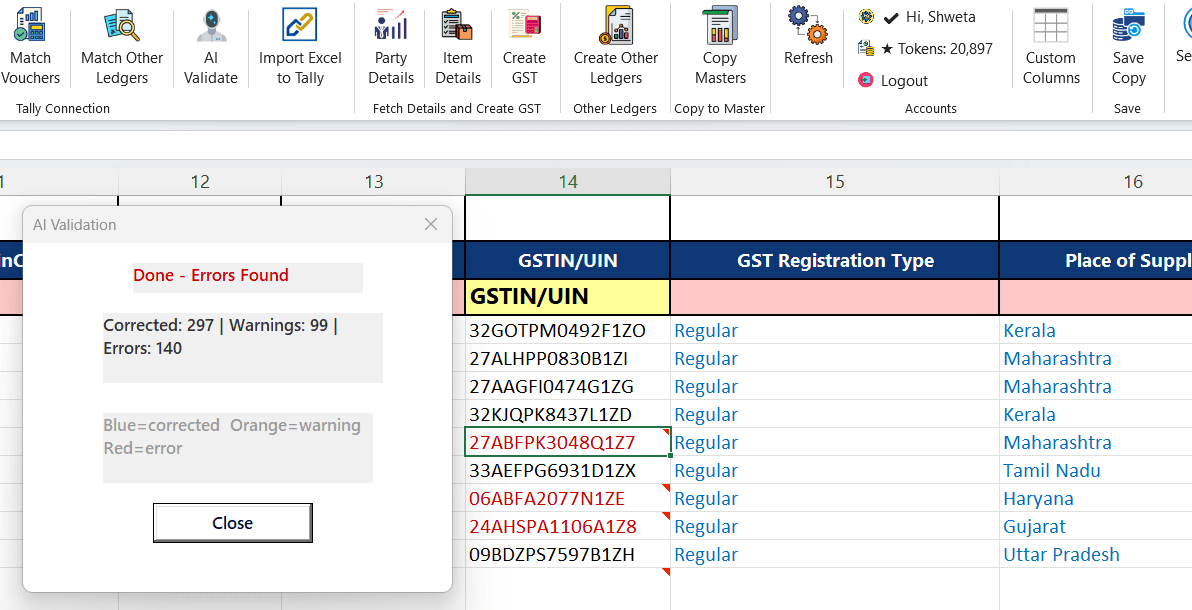
Real-Time AI Validation with Tally
The fastest validation engine — compares your Excel data against actual Tally data in real-time. Auto-corrects errors and shows color-coded results: Blue (auto-fixed), Orange (warnings), Red (needs attention).
- Validates GSTIN, HSN, dates, amounts against Tally masters
- Fuzzy-matches party names and ledgers with Tally data
- Auto-corrects spelling mistakes in ledger names
Suvit: Basic validation without real-time Tally data comparison. Cannot auto-correct against your actual Tally masters.
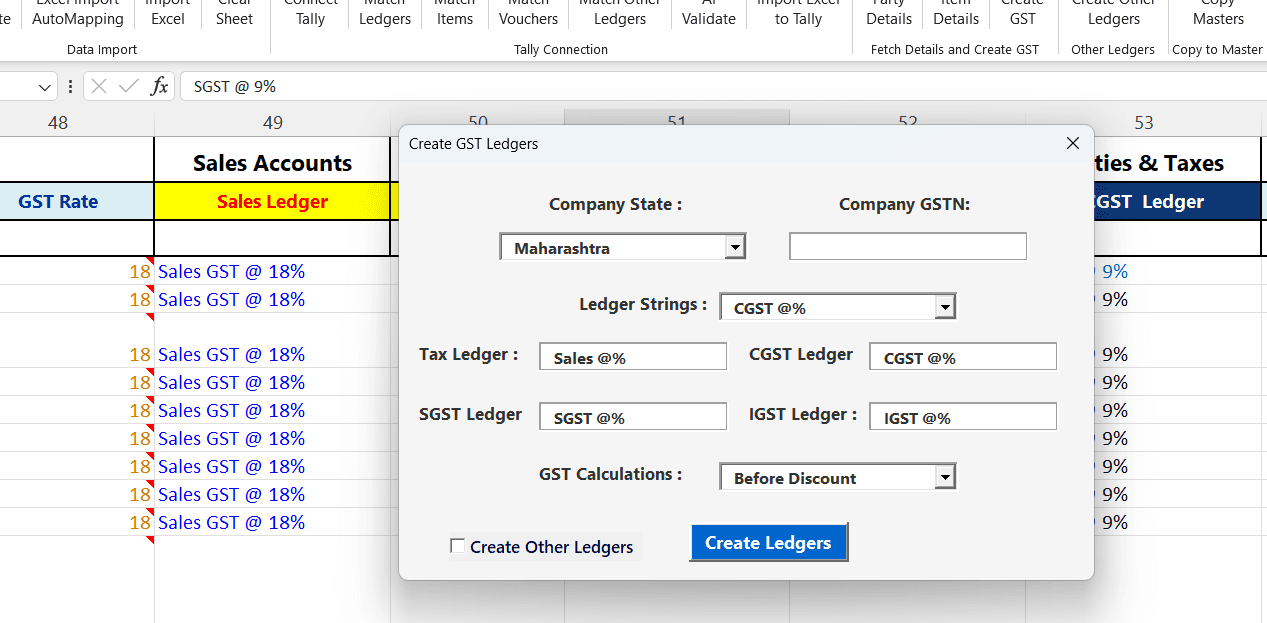
GST Report Error Correction
File GST returns with zero errors. TallyConnects AI validates and corrects all GST-related fields before import — no more mismatches between your books and GST portal.
Suvit: Limited GST validation. Cannot auto-correct GSTIN format, derive place of supply, or validate against known GST rates.
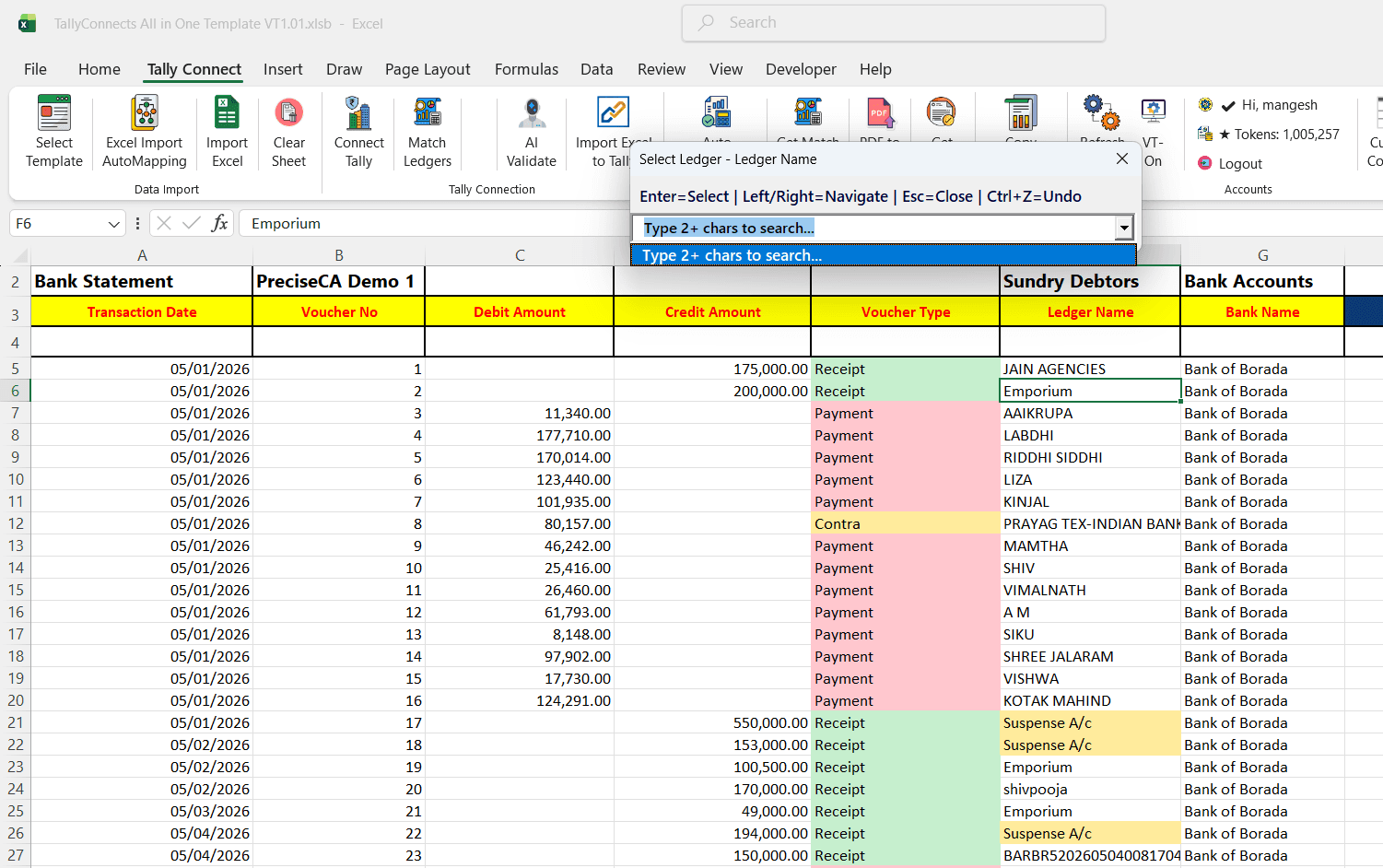
Bank Statement — Any Format, Any Bank
Import any bank PDF — Nationalised, Private, or Co-operative banks with complex multi-line formats. AI reads narrations and fuzzy-matches party names to your exact Tally ledger spellings.
- 100+ bank templates with auto-detection
- Auto voucher type: Receipt / Payment / Contra
- Narration-to-ledger matching with exact Tally spelling
Suvit: Supports bank import but requires manual voucher type selection and does not match narrations to Tally ledger spellings.
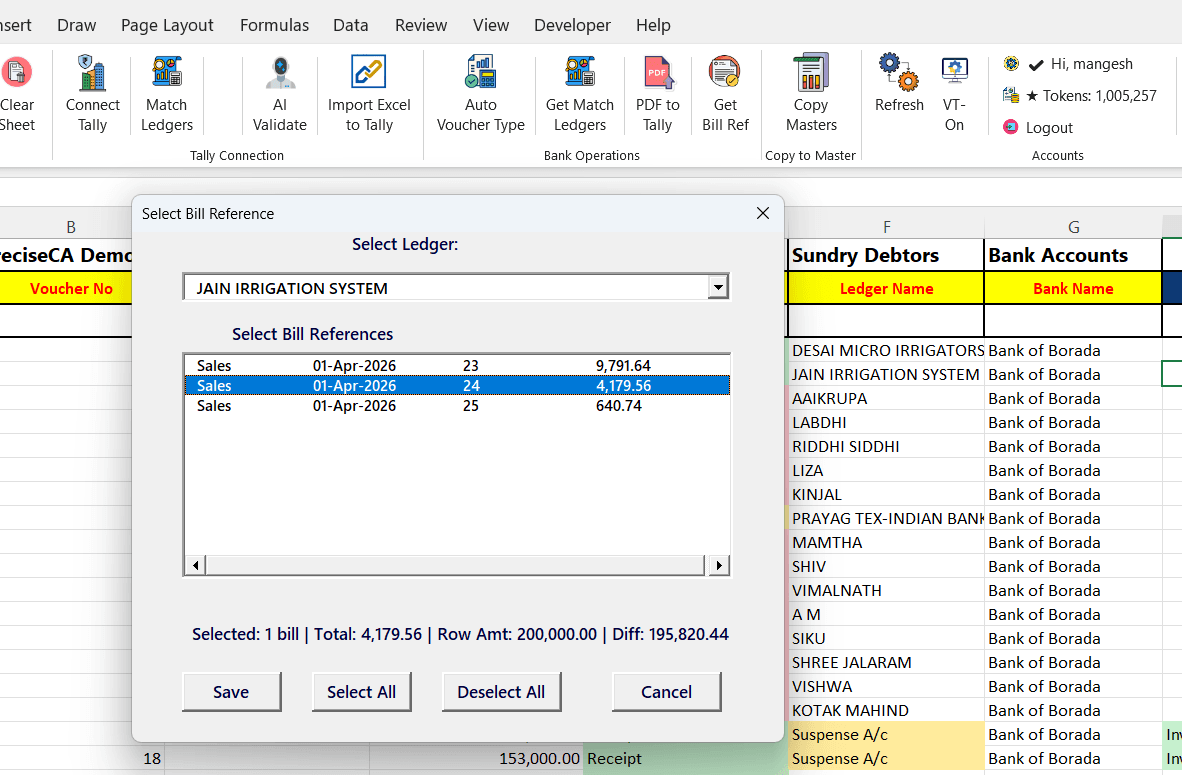
Bill Reference Allocation
The feature no other tool offers. Before creating each bank voucher, TallyConnects fetches all outstanding invoices for that party directly from Tally. Select which bills to adjust — avoiding bank reconciliation mistakes and ensuring 100% accurate bill-by-bill matching.
Result: Zero reconciliation errors. Every receipt and payment is correctly matched to its invoice — no manual lookup needed.
Suvit: Does not offer bill reference matching. Bank entries are posted without invoice allocation, leading to reconciliation issues.
Complete Feature Comparison
| Feature | TallyConnects | Suvit |
|---|---|---|
| Data Privacy | 100% local — data never leaves your computer | Cloud-based — data uploaded to their servers |
| Interface | Excel Add-in — works inside Excel | Web-based portal |
| Pricing Model | Pay per use (Rs 0.10/voucher) | Monthly/yearly subscription |
| AI Auto-Mapping | Yes — auto-matches columns intelligently | Basic mapping |
| AI Validation | Real-time Tally data comparison & correction | Basic validation |
| GST Error Correction | Auto-corrects GSTIN, HSN, State, Rates | Limited |
| Bank Statement Import | Any bank PDF with narration matching | Yes |
| Auto Voucher Type | Receipt/Payment/Contra auto-detected | Manual selection |
| Bill Reference Matching | Yes — fetches invoices from Tally before posting | No |
| Offline Tally Access | Yes — connects to local Tally directly | No — requires internet |
| E-Invoice IRN | Yes — bulk generation from Excel | Limited |
| E-Commerce Import | Amazon, Flipkart, Meesho, Myntra | Limited |
| Auto-Create Masters | Ledgers, Stock Items, GST Ledgers | Yes |
| WhatsApp Automation | Not yet | Yes — document upload via WhatsApp |
| PDF to Tally | Yes — AI extraction | Yes |
| User Base | 25,000+ users | 10,000+ firms |
Where Suvit Excels
- -Large user base with 10,000+ accounting firms and established brand
- -WhatsApp-based document upload — clients can send documents directly via WhatsApp
- -Web-based interface accessible from any device without Excel installation
Frequently Asked Questions
Is my data safe with TallyConnects?
Yes, 100%. TallyConnects is a local Excel Add-in — your data never leaves your computer. Unlike Suvit which requires uploading data to cloud servers, TallyConnects works entirely offline between Excel and Tally. No financial data is stored on any external server.
Is TallyConnects better than Suvit for bank statement import?
Yes. TallyConnects supports 100+ bank formats including co-operative banks, auto-detects voucher types, matches narrations to Tally ledgers, and uniquely offers bill reference matching before posting — which Suvit does not provide.
Does TallyConnects work offline?
Yes. TallyConnects connects directly to your local Tally instance. No internet is required for data posting. Suvit requires internet as it is web-based.
Which is cheaper — TallyConnects or Suvit?
TallyConnects uses pay-per-use pricing at Rs 0.10 per voucher with no subscription. Suvit requires monthly or yearly subscriptions. For most users, TallyConnects costs significantly less.
Can TallyConnects correct GST errors automatically?
Yes. TallyConnects AI validates and auto-corrects GSTIN format, HSN codes, state names, GST rates, place of supply, and amounts in real-time by comparing with actual Tally data.
Try TallyConnects Free
100 free tokens included. No subscription, no credit card. Download and compare for yourself.